
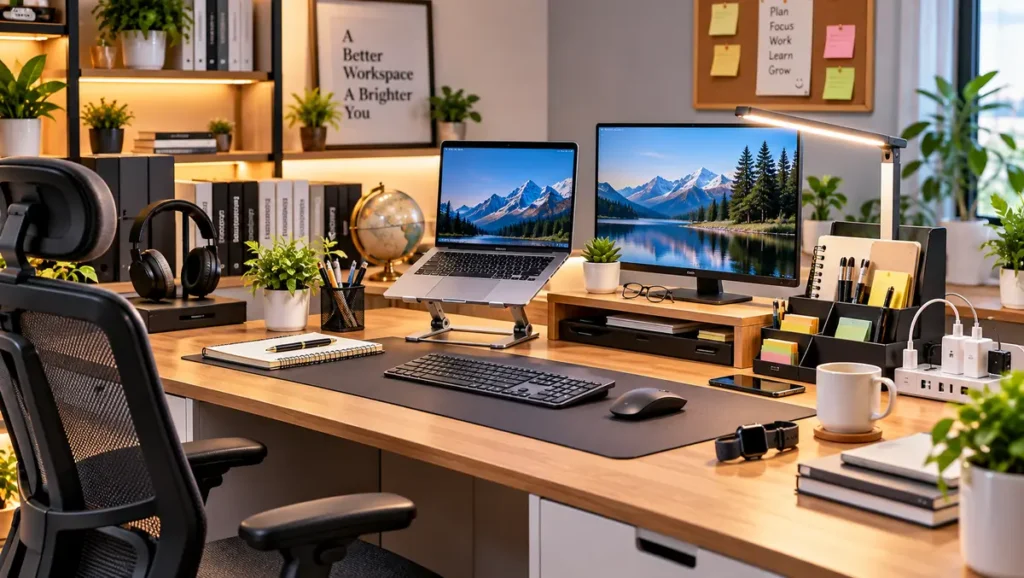
A well-organized workspace can make a big difference in the way you study or work. Whether you work from home, attend online classes, prepare for exams, or spend several hours at a desk, the right Office & Study Accessories can improve organization, comfort and productivity.
You don’t necessarily need an expensive office setup. A few carefully selected accessories can help keep your desk clean, manage cables, improve your posture and make everyday tasks easier.
In this guide, we look at 10 essential office and study accessories worth considering for a modern and productive workspace.
Also Read: 10 Best Kitchen Storage Ideas to Save Space & Keep Your Kitchen Organized
Why Are Office & Study Accessories Important?
A desk can quickly become cluttered with notebooks, chargers, cables, stationery and electronic devices.
The right accessories can help you:
- Keep your desk organized
- Reduce unnecessary clutter
- Improve your working comfort
- Manage cables more effectively
- Create a better study environment
- Keep important stationery within reach
- Improve your overall desk setup
Instead of buying everything at once, identify what your workspace actually needs and choose accessories accordingly.
1. Ergonomic Office or Study Chair
A chair is one of the most important parts of any workspace.
If you spend several hours studying or working, a comfortable chair with proper back support can make your desk setup much more practical.
What to look for:
- Comfortable seat
- Proper back support
- Adjustable height
- Strong base
- Suitable seat width
- Good-quality wheels if required
- Breathable material for long sitting
An ergonomic chair can be particularly useful for people who work from home or study for extended periods.
Buying Tip: Don’t choose a chair only because it looks attractive. Comfort, adjustability and support should be your priorities.
2. Laptop Stand
A laptop stand is a simple accessory that can make a major difference to your desk setup.
Keeping a laptop at a more comfortable viewing height can help create a cleaner workstation and make it easier to position your screen.
Laptop stands are available in different materials and designs, including aluminium, plastic and adjustable folding models.
Look for:
- Adjustable height
- Stable construction
- Non-slip pads
- Good ventilation
- Foldable design if you travel frequently
For people working from home, a laptop stand can also free up some space underneath the laptop for a keyboard or other accessories.
Also Read: 15 Home Organization Ideas to Keep Your Home Clean & Clutter-Free
3. Desk Organizer
A desk organizer is one of the most useful Office & Study Accessories for keeping small items under control.
Pens, pencils, markers, scissors, sticky notes and other stationery can easily create unnecessary clutter.
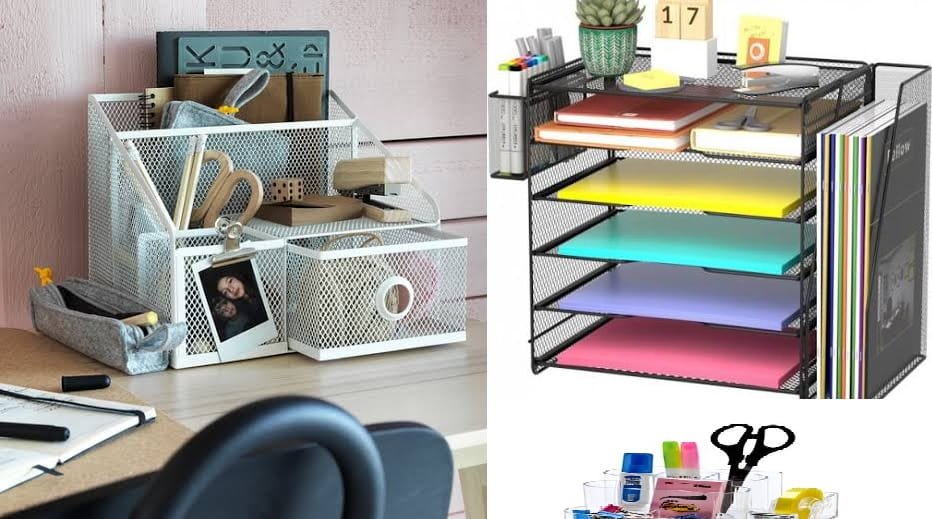
A multi-compartment desk organizer gives each item a dedicated place.
You can use it for:
- Pens and pencils
- Highlighters
- Scissors
- Markers
- Sticky notes
- Small stationery items
Buying Tip: Choose an organizer based on the amount of stationery you actually use. A very large organizer can sometimes take up more desk space than necessary.
4. LED Desk Lamp
Good lighting is an important part of a comfortable study or work environment.
A desk lamp can provide focused lighting when you are reading, writing or working at your computer.
Modern LED desk lamps often come with useful features such as:
- Adjustable brightness
- Multiple lighting modes
- Flexible neck
- Touch controls
- Timer functions
- USB charging
A compact lamp is especially useful if you have a small study table.
Buying Tip: Look for a lamp that provides comfortable illumination without creating distracting glare on your screen.
5. Wireless Keyboard and Mouse
If you regularly use a laptop or desktop computer, a wireless keyboard and mouse can help create a cleaner workspace.
Removing unnecessary cables from the desk can make the setup look more organized while also giving you greater flexibility in positioning your devices.
Advantages include:
- Cleaner desk appearance
- Less cable clutter
- Easy repositioning
- Convenient everyday use
- Useful for work-from-home setups
When choosing a keyboard, consider key layout, typing comfort and battery life. For a mouse, look for comfortable shape, reliable tracking and suitable size.
Also Read: Best Kitchen Storage Organizers for Small Kitchens: Complete Buying Guide
6. Desk Mat
A desk mat can make your workspace look more polished while also protecting the surface of your desk.
It provides a smooth area for your keyboard and mouse and can help prevent small scratches or marks on the desktop.
Desk mats are available in different materials and sizes.
Popular choices include:
- Leather-style mats
- Fabric mats
- PU mats
- Large extended mouse-pad designs
For a minimalist workspace, a large neutral-colored desk mat can create a clean and professional appearance.
7. Cable Management Box
Modern desks can have several cables running between laptops, monitors, chargers, speakers and other devices.
A cable management box can help hide excess cables and power adapters while making the workspace look cleaner.
A good cable management solution should:
- Have sufficient space
- Allow easy cable access
- Provide ventilation
- Be made from durable material
- Match your desk setup
You can combine a cable management box with cable clips or cable sleeves for an even cleaner setup.
Also Read: Best Power Banks for Everyday Use: A Complete Buying Guide
8. Notebook and Planner
Even in a digital workspace, a notebook and planner can still be extremely useful.

You can use a notebook to quickly write down:
- Daily tasks
- Meeting notes
- Study topics
- Ideas
- Shopping lists
- Important reminders
A planner can also help you divide larger tasks into smaller daily goals.
For students, a simple study planner can help organize subjects, assignments and revision schedules.
Buying Tip: Choose the notebook size according to your routine. A compact notebook is easier to carry, while a larger notebook provides more writing space.
Also Read: How to Choose the Best Power Bank for Your Phone
9. Monitor Stand
If you use a desktop monitor, a monitor stand can be a useful addition to your workspace.
Apart from raising the monitor, some monitor stands include storage space underneath for keyboards, notebooks or other small items.
This can help make better use of limited desk space.
Look for:
- Strong construction
- Suitable weight capacity
- Stable base
- Appropriate height
- Storage space if required
If you have a small desk, a monitor stand with built-in storage can be particularly practical.
10. Power Strip or Extension Board
Modern workspaces often require multiple power connections.
A suitable power strip or extension board can provide convenient access to power for devices such as:
- Laptop chargers
- Monitors
- Desk lamps
- Speakers
- Phone chargers
- Other office electronics
When purchasing one, pay attention to build quality, safety features, cable length and the number of sockets.
Important: Choose electrical accessories from reputable manufacturers and use them according to their rated capacity. Avoid overloading a power strip.
How to Choose the Right Office & Study Accessories
You don’t need to purchase every accessory immediately.
Start by identifying the biggest problems with your current workspace.
If your desk is cluttered
Start with:
- Desk organizer
- Cable management box
- Desk mat
If you work on a laptop for long hours
Consider:
- Laptop stand
- External keyboard
- Wireless mouse
- Comfortable chair
If you study at night
Consider:
- LED desk lamp
- Notebook and planner
- Comfortable chair
If you use multiple electronic devices
Consider:
- Power strip
- Cable management accessories
- Wireless peripherals
This approach can help you spend money on accessories that actually improve your daily routine.
Also read: 10 Essential Tools Every Homeowner Should Have | Complete DIY Tool Guide
Office & Study Accessories Buying Checklist
Before purchasing an accessory, consider the following:
1. Available Space
Measure your desk before buying large accessories such as monitor stands, desk organizers or lamps.
2. Build Quality
A cheaper product isn’t always better value. Look for durable materials and reliable construction.
3. Practicality
Ask yourself whether you will actually use the accessory regularly.
4. Compatibility
For electronic accessories, check compatibility with your laptop, computer, smartphone or other devices.
5. Warranty
For electronic products, checking warranty and after-sales support can be worthwhile.
6. User Reviews
When shopping online, read recent customer reviews and pay attention to recurring complaints.
How to Create a Clean and Productive Desk Setup
A productive workspace doesn’t have to be complicated.
Try this simple arrangement:
Center:
Laptop or monitor
Side:
Desk lamp
Front:
Keyboard and mouse
Corner:
Desk organizer
Under the desk:
Cable management box
Drawer or shelf:
Notebook, stationery and less frequently used items
Keep the items you use every day within easy reach and move everything else into drawers, shelves or storage boxes.
Final Thoughts
Creating a comfortable and organized workspace doesn’t require a huge investment.
The right Office & Study Accessories can help you make better use of your desk while keeping everyday work and study essentials organized.
Start with the accessories that solve your biggest problems. A laptop stand can improve your setup, a desk organizer can reduce clutter, a desk lamp can provide focused lighting and cable management can make the entire workspace look cleaner.
Whether you’re a student, remote worker, freelancer or home-office professional, a thoughtfully designed workspace can make your daily routine more comfortable and organized.
At TruCoreHub, we will continue to share practical product guides, buying tips and useful recommendations to help you create a better home and workspace.
Frequently Asked Questions
What are the most useful Office & Study Accessories?
Some of the most useful accessories include a laptop stand, desk organizer, LED desk lamp, wireless keyboard and mouse, desk mat, cable management accessories and notebook.
What should I buy first for a study desk?
Start with the basics: a comfortable chair, suitable desk, good lighting and a desk organizer. Add other accessories according to your requirements.
Is a laptop stand worth buying?
For many laptop users, a laptop stand can be a useful addition because it allows more flexible screen positioning and can create a cleaner desk setup.
How can I keep my study desk organized?
Use a desk organizer for stationery, cable management accessories for wires and drawers or storage boxes for items you don’t use every day.
Are expensive desk accessories better?
Not necessarily. Focus on build quality, functionality, compatibility and user reviews rather than price alone.